Learn more...
|
|
 |
|
Latest Release Information
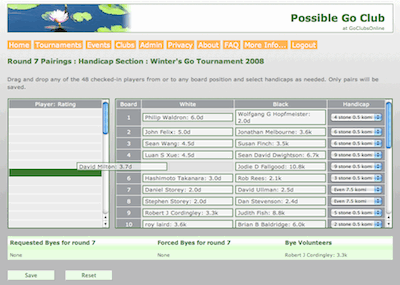
Drag 'n drop manual pairings
On this page, see the new release information for:
When necessary, we may update GoClubsOnline with additional features between these dates so in some cases each date corresponds to a culmination of significant effort and an accumulation of a number of changes.
Choose a date to see a summary of each release. Dozens of minor improvements are also included each time.
New Features – August 2026 Release
In this release we have added import and export features for any Club Library. Club organizers can now take a spreadsheet book list and for club members put it online in GoClubsOnline for viewing, checking out and returning.
Along with a number of other tweaks, for TDs, we have added a report to review tournament registrants with expired AGA Nos.
New Features – December 2024 Release
This is a major release:
- Added an Equipment Inventory module (aka Asset Management) that can be enabled in the club's profile. It provides a listing of club property and like the Library Catalog, lets club members borrow and then return club assets. Organisers can upload one or two photos of any asset for better identification.
- Added a warning if the AGA or club fees haven't been specified for the appropriate year when adding or updating an event or tournament.
- Added an email feature for club organizers to send 'one click' email reminders regarding any upcoming tournament or event to registrants. A pre-populated and editable email may be sent with the event's details and other remarks an organizer may wish to add.
- Added specifiable Table/Board Starting Nmbers in the Pairings Parmaeters for any section. Actual Table/Board numbers are assigned during the pairings process. By default numbers start at 1 (one).
- Allowed inclusion of live links in Tournament and Event Sponsor fields.
- Included lots of minor tweaks.
- Added tighter code over maintenance mode when updates are releasesd or sometimes tested.
- GoClubsOnline is now running on PHP v7.4.
New Features – May 2023 Release
This is a minor release to add the option for TDs to offer AGA Membership during tournament registration as needed, or not.
New Features – June 2020 Release
This is a minor release to improve performance and fix some bugs.
Added option for TDs emailing players in on-line tournaments to include all attendees or just section players.
New Features – September 2019 Release
We have added some features and updates for Tournament Directors and Club Administrators:
Linear and exponential registration trend lines are now positioned better.
- Added a new historical registration trend line comparison to show past trends for tournaments or events and better predictions of attendance.
- Adding an attendee to a tournament or event now has improved streamlined approach to finding a subscriber which also prompts to add a person when finding no one.
- Added a trap to prevent deleting attendees to a tournament when they have games paired or played on file.
- Added a PayPal option when editing transactions.
- Library loan period is now configurable by club.
- Library loans can be extended or renewed by Club Administrators.
- Included improvements to PayPal processing.
- AGA tournament results file name changed to YYYY-MM-DD-[city]-[o|h].txt, replaces the generic 'TournamentResults.txt' for easier processing at the AGA.
- Updated the AGA club codes.
- Included some improvements to self-paired tournament requested byes.
- Added a PayPal Donate button for supporters.
along with some minor improvements, a variety or bug fixes and technical improvements, namely an update to all MySQL calls.
> top
New Features – March 2017 Release
In addition to some minor improvements we have provided a couple of new features:
- While tournament directors can already 'Check missing AGA Nos.' they can now 'Find mismatched AGA names'. This new report lists everyone in the tournament whose GoClubsOnline account name doesn't match their AGA membership account name. This helps find persons who may have entered the wrong AGA No. EGF classed tournaments have the same feature with the EGF listing.
- Tournament planners can now refer to regression curves on the Registration Trends charts to make attendance predictions. Both straight line and exponential regression curves are offered.
and a variety or bug fixes.
> top
New Features – July 2016 Release
In order to help Tournament Directors, see these new features:
- Self-paired Tournaments are now supported in GoClubsOnline: Tournament Directors can include a self-paired round in their tournaments or run a self-paired only tournament. Result statistics are available for Awards (see below) and current and final standings. Results from all rounds are compiled into a single emailable report for AGA and EGF purposes. (Even self-paired Rengo tournaments are supported.)
- Awards: we have added an additional report that can be examined any time during the pairings process showing the current and final status of awards for the customary Champion, Hurricane, Philanthropist, Dan Killer, Kyu Killer, Sensei and Straight Shooter categories. Opponents average entering rating is also calculated for tie-breaker purposes.
- More Rounds Options: we also extended the allowable number of (paired) rounds in a tournament to 0-12 from 3-10. Zero is used for self-paired only tournaments.
- Congress Bands: for larger tournaments – tested up to 400 players – we have added a new 18 band selection 'Congress' bands modeled on the US Open at US Go Congresses.
- Team Tournaments: we have improved the handling of team tournaments for both Handicap and Open section choices. For example, winning certificates for each team can now be printed: each lists all the members of the team.
- Miscellany: copying an old tournament [profile] will always put it into the next 12 months regardless of how long ago it was held.
In order to make the site more club friendly, we've introduced a number of changes that allow clubs to more fully 'brand' their pages including:
- Custom images: Club Administrators can now 'brand' their club, tournament and event pages along with their membership cards, business cards and player/attendee badges. Club logos and graphics can be easily uploaded.
- A Home Club theme is now a subscriber's default theme after logging in. Subscribers can always change their Home Club selection under My Account > My Preferences. The club name will be shown prominently instead of 'GoClubsOnline'. Pages for tournaments and events hosted by other clubs will continue to sport their theme and club name.
- A Home Club Recent News panel is now available at the top of the Welcome page in a collapsible panel. Club organizers can specify how many news items to list from 1 – 10 in their club profile and whether to show or hide this feature altogether. Visitors unaffiliated to any club will naturally see no club news panel. Club volunteers can use this feature as a mini blog.
- Club News editing: we've upgraded the rich text editor that's invoked when adding or editing club news items to increase flexibility and give organizers much more control over the appearance of their Club News. Links, images and now videos and tables can be included in a news item for the benefit of club members.
The combination of these features give GoClubsOnline a less obtrusive presence and a limited blogging capability for club organizers.
We've enhanced the Login screen to be more open about activities and usage of GoClubsOnline by including panels for:
- Any Events that are open for online registration
- Participating clubs
- Recent Tournaments and Events managed inside GoClubsOnline
- GoClubsOnline News
Clicking on the big 'I' for any tournament or an event that is listed for online registration now brings up a popup window showing all its details. This replaces the previous scrolling panel.
> top
New Features – April 2016 Release
Most of the new features in this release have been included at the request of our users (indicated by an asterisk *).
- * TDs can choose how paired games are assigned to board (or table) numbers. Traditionally, stronger players are assigned to lower board numbers. New options are available in the Pairings Parameters so that games can be assigned by White's last name, by White's Entering Rating, by White's Band/Wins/Rating record or randomly
- * An 'Auto' option has been added to the handicap options when adjusting pairings manually. GoClubsOnline will set the handicap for two players based on their entering ratings and the Pairings Parameter Handicap Calculation setting for the tournament.
- Club Administrators can now see what Payment Form (e.g Cash, Check or PayPal) was exercised when working on transactions.
- * Club Administrators can choose to export information on the registered attendees at their tournaments and events into a .csv file.
- * Players' Entering Ratings are now included in the tournament Check-in screen.
- * Subscribers' can now see attendees' playing strength when viewing the attendees of any event.
- * The number of rows selected to show in displays is now remembered between pages. For example, if the user selects Show 50 rows of attendees, this number will be used as a default for all other displays where the number of rows can be selected (e.g. Publications lists, Checkin lists, Meal Orders).
- Handling of membership dues, when Adult/Youth levels are free but other levels are not (e.g. Sustainer), has been improved.
- * Players' names have been added to certificates for winning teams in Rengo tournaments.
Many other minor improvements and enhancements have also been included in this release.
> top
New Features – February 2016 Release
Two important changes are included in this release:
- the ability of clubs to include a PayPal account for club membership payment processing
- an extension to the Tournament Management and Pairings module allowing Tournament Directors to hold Pair Go or Rengo tournaments. Pair Go is a special instance of Rengo tournaments in which two players, usually a male and a female, form a team to compete against other similar teams. Gender requirements are the responsibility of tournament organizers to verify. Rengo allows for an unlimited number of players on a team without any other requirements for gender.
Some minor updates have also been included in this release.
- Added improvements to the user interface using icons to support available user actions.
- Contact information (Tournament Director) is now included in the Tournament Details report.
- For added flexibility references to lunch or lunches have been changed to Meal allowing organizers to offer a Lunch, Supper, Dinner or any other kind of meal.
- Improvements to administration of Go Server information.
- Added a 'What is Go? page for pre-logged in visitors.
> top
New Features – May 2015 Release
These new features while easy to summarize have taken some significant rework to implement:
- Added PayPal integration so visitors can pay online for tournament and event registrations with a credit card or PayPal account. Organizers can optionally invoke this feature with their own PayPal account. None of these funds are directed to GoClubsOnline
- Subscribers can now cancel their participation in tournaments and events while preserving their registration record. Cancelled registrations are ignored from all other activities except in the Club Admin report on Cancelled Registrations. A subscriber can resurrect or undo this cancellation during the open registration period for any event or tournament.
- The main side bar navigation menu can be collapsed and expanded to show the features of the different sub-headings.
- A round of minor bug fixes and enhancements.
> top
New Features – November 2014 Release
The emphasis on this release has been to add tools to help Tournament Directors manage their AGA tournaments even more easily. We have:
- added a reverse lookup for missing AGA Numbers against the AGA's TDList. (Menu item shows up for AGA Rated tournaments in Tournament Management Reports Panel.)
- included a warning on empty address fields in the AGA Dues email handling
- automated daily AGA and EGF TD List downloads. (Runs overnight, US Mountain Time)
- included a McMahon Bar to our Pairings Module to allow all games above a certain configurable rank be forced to even games in Handicap tournaments. In some cases this can avoid the need for a separate Open Section where games are generally played Even.
- added the option to email pairings of each round to all players to support online tournaments. (Menu item shows up when appropriate for each round in the Pairings Management page.)
For club book-keepers we have:
- included a date range when searching book-keeping transactions. Club Admins can search transaction lists for their Club, any tournament or any event. The date range uses a popup date picker to set the begin and end dates.
For club librarians we have:
- added a publications attribute of 'Comments' for use by the club librarian. It might carry references to almost anything, e.g. 'good for beginners'. The field is included in the Search function and column sorting.
We restyled the main menu so menu items wrap well for Google Translated foreign languages for our non-English speaking friends. Try Belarusian to see what we mean.
> top
Changes and Updates – February 2013 Release
This was a minor release in that some internal aspects of GoClubsOnline were improved. We reworked many pages to provide improved print format when screens or reports are printed from a browser. For example, the main menu is not included in browser prints since it serves no purpose on a paper document. We cleaned up dozens of minor issues.
> top
New Features - Nov 2012 Release
Team Tournaments
In this update we have added tools and features to help run Team Tournaments. A tournament can be designated a Team Tournament (instead of an Individual Tournament) in its profile. This 'wakes' up the team tournament features. A tournament organizer (a Club Administrator) will see new menu items in the Tournament Administration screen to add, edit and delete teams. Registered players for the tournament can then be assigned to a team. Various reports and displays will correspondingly show the team membership. Aggregated statistics of participating teams are also available. Optionally, the pairings module can be used to pair players from different teams after automatically setting up banned pairings of players within a team.
Early Registration Discount
Early Registration Discounts can be offered to people attending either tournaments and events. The organizer can offer percent discounts or fixed cash amounts and define when the early registration discount expires.
Tournament Pairings Module Updated
A revised Pairings Module is included in this version that we believe is now even better.
Event Attendee Badges
Tournament organizers have been able to print name badges for players for some time. This feature is now available for people attending events.
> top
New Features and Extra Options - Mar 2012 Release
Tournament Pairings
After extensive beta testing our integrated pairings module is now available to all Club Accounts - see your Club Profile optional features.
Google Translate
Though imperfect we have integrated Google Translate into GoClubsOnline in order to make the site more accessible to non-English speaking Go volunteers and organizers. Proper names such as people's names, tournament names, event names, addresses, states/provinces, cities and countries are not translated. (Please let us know if we may have missed any). Google Translate is a machine learning approach and supports some 52 languages. Several languages when translated are delivered in their associated writing system (e.g. Chinese, Hebrew, Arabic)
QuickStart Mode
To provide an easier way for Club Administrators to access the most frequently used tools, we have added a QuickStart mode. In QuickStart mode a schematic shows the often used functions for Tournament Management, Pairings Management, Event Management and Club Management. An icon - clock and arrow  - indicates when QuickStart mode is available. - indicates when QuickStart mode is available.
Library Catalog
In a continuing effort to accommodate all cultures, publications in a club's Library Catalog are now identifiable by the language in which they are written. Correspondingly, Library Catalogs may be searched on the Language field. By default all entries will be set to 'English' - make changes as necessary.
Appearance and User Interface
The appearance of the site has been improved in many, many ways. For example:
- We use a calendar date picker for all date entry.
- In the pairings module, entering results for each round is easier with an improved interface and display.
- Membership card and prize certificate choices are improved.
- Tournament, event and club locks are now more accessible with icons.
Oh and one last thing...
New Lower Rates
While GoClubsOnline is developed and supported by volunteers to bring you more and more features, with the growing support from an increasing number of participating Go Clubs, we are now able to reduce our rates for new and renewing Club Accounts. For nearly all clubs (up to 50 members) the annual fee is now $39/yr down from $95/yr. Unlimited club membership is available for $79/yr.
You are encouraged to download the latest issue of the Club Administration User Manual (v1.6.3)
> top
New Features and Extra Options - Nov 2011 Release
For winter 2011/12 we are happy to make another significant release. These improvements stem mostly from the beta-testing of our pairings algorithm with additional changes that allow more options and even easier operations of tournaments.
- To help TDs register new GoClubsOnline (GCOL) Registrants, TDs may activate the unactivated account of any subscriber who can provide their userid and password. New GCOL subscribers who may not yet have received their activation emails can have their account activated by their Club Administrator/Tournament Director (TD).
- TDs can offer their attendees up to four Lunch Choices. Such options can include a list for each choice that could be used for up to four courses or used to specify beverage options in addition to other options.
- Requested Byes by round and Bye Volunteer status can now be edited on one page. 'Mass editing' of many attendees' bye information makes this a faster process.
- TDs can set/edit band separations (Initial McMahon scores) manually. Our pairing algorithm favors finding pairs with players of similar strengths. By setting bands with larger initial score separations, e.g. 2 points between bands instead of one, tends to require winning players to win more games before meeting players in the next band up.
- TDs can choose to pair within bands as well as prevailing score-groups (default). Generally, pairings are favored among players in the same score group. A score groups consists of players with the same score - initial score + the number of wins.
- TDs can choose to avoid forcing a bye on a player who has a requested bye in a future round (preferred). Or TD's can ask the pairings algorithm to ignore any future requested byes.
- TD contact information is now automatically added to the AGA tournament results report. The TD contact information includes available address, email and any phone number. This information is shared with AGA membership and database managers.
- TDs can choose from several options for how colors are set for Open Tournament games with the corresponding printable Results Slips capturing the colors under the 'Players Choose' option. Other options are 'Random', 'Stronger Player', 'No Same Color 3x' (part of the AGA spec.)
- TDs can choose whether tournament round results are published within GCOL to other subscribers. GCOL subscribers can see tournament results by round as they are posted from links in their home page. If a TD wishes, this information is not made available.
- TDs can print Special Award tournament certificates with their own title or choose from a list including the 'Youngest Player', 'Champion', 'Dan Killer', 'Kyu Killer' and so on. These are in addition to Prize Band certificates and are printable in a similar format.
- an improved pairings algorithm that generates fewer forced byes. Additionally, the algorithm is becoming more and more robust for a wider and wider variety of tournament circumstances.
Where necessary, online documentation (more info...) has been updated to provide additional details.
> top
New Features and Extra Options - Aug 2011 Release
 For fall 2011 we are happy to make another major release. On-line event registration is now available for your workshops, classes, lectures and pro visits or anything else you care to present. You can spread the word about your club with Club Business Cards matching your Club Membership cards. Staying in touch with your members is even better since you can now include attachments in your emails to them.
With events and tournaments schedulable through GoClubsOnline we've included a new Calendar display that let's you browse and search any events and tournaments offered.
Our biggest improvement is the availability of our Integrated Pairings module. Available to beta-testers, the entire tournament experience can now be managed seamlessly in these simple steps:
- publish your tournament,
- accept on-line registrations,
- check-in players on-site,
- manage rounds,
- generate pairings,
- identify winners in a tiebreaker reports
- email results to the AGA (for AGA rated tournaments)
- print winners certificates
- check tournament Profit and Loss
You can also print results slips for each game. You can also print player badges for participants in your tournament.
Our extensive easy to use Tournament Pairings 'Control Panel' makes tournament execution a breeze. Using drag-and-drop, you can manually pair players or mark pairs of players prohibited from playing. You can choose from a variety of band settings (McMahon, Dan/SDK/DDK/Beginner, etc.), choose how handicaps are calculated, and on and on. No shows can be accommodated by manually pairing 'abandoned' players after generating pairings. Choose tie-breakers and monitor progress after each round. Settings can be changed at any time and used for the tournament from that point on or... you can just take the defaults and run.
If you are interested in joining our Beta-testing team, for qualified clubs, we will offer a free Club Account. Please email us for details or use our feedback form, but note this is a limited time offer while beta-testing is going on.
> top
New Features and Extra Options - Jan 2011 Release
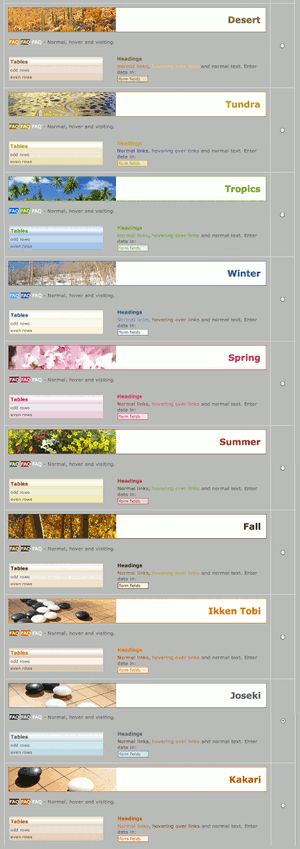 During late 2010 we increased the number of options and added a lot of new features to make GoClubsOnline even easier and more powerful for Club Administrators. Of these the biggest improvements are the availability of stationary in ISO sizes, more membership card designs, more prize certificate borders, more Club Themes and the new Dashboard section to Club Management.
Extra Options
- A club's Theme can now be chosen from previews (shown right), under the Club Management > Preferences.
- Nine new Club Themes (club color scheme and banner images) have been added for a total of 18:
- Desert
- Tundra
- Tropics
- Spring
- Summer
- Fall
- Ikken Tobi
- Joseki
- Kakari
These themes may also be used in Membership Card printing extending the number of Membership Card options. You may now choose a theme in one of three series: Ecology, Seasons or Go-related.
- We have also significantly increased the number of (non-theme) Membership Card background designs from 5 to 30.
- We have significantly increased the number of Prize Certificate borders from 13 to 60, ranging from Classic to Contemporary.
- ISO standard stationary sizes (i.e. A4) can be selected for all stationary printing options (Membership Cards, Mailing Labels, Prize Certificates). Corresponding Avery label template numbers are provided.
- Some Club Administration pages now have the option to show either AGA credentials or EGF credentials.
New Tournament Management Features
- Tournaments must now be 'Published' before regular subscribers can see them for online registration or planning purposes.
- Tournaments can now be 'Cancelled' preventing any more online registrations but keeping existing registrations for email purposes or possible refunds.
- A separate fee/price structure can be included for persons registering on site (at-the-door). Either this can be represented as a 'late fee' or normal online registration can be 'discounted' from at-the-door fees.
- Line feed characters are accepted in critical Tournament Profile fields obviating the need to use the HTML <br> tag.
- Club Administrators can now access a Tournament Profile from the Tournament Management page avoiding extra clicks to visit the Club Management page.
- Prize Certificate choices (border and paper size) are consolidated and can now be accessed in their own page directly from the Tournament Management page.
- 'Box Lunch' is now just 'Lunch' in tournament profiles and tournament listings.
- The pairings program PyTD v3 export is now up to date.
New Club Management Features
- Added a new Dashboard feature for Club Management showing a wide variety of charts including membership history and comparisons of the club's tournament trends on attendance, registration and finances. Charts may be chosen for different periods, different line styles, and in either normal or printer friendly versions.
- Subscribers may now set the Home Club more simply under Preferences instead as part of their Profile.
- European Go Federations (EGF) PIN numbers can now be included on Membership Cards (as well as AGA membership numbers).
- Membership Card choices (background, layout and paper size) are consolidated and can now be accessed in their own page from the Club Management page avoiding a visit to the Club's Profile.
- Club Admins may now edit member and affiliate records with relaxed criteria for required fields (e.g. postal address is not required).
- Sales records may now be deleted in case of errors.
New Email Features
- Included salutations and sign-offs are now shown in email preparation pages.
> top
Send us your ideas on how to improve GoClubsOnline to admin@goclubs.org or use our feedback form after you login.
|
