
GoClubsOnline
|
Login nowLearn more... |
 |
Tournament Pairings With our Integrated Pairings Module, clubs can now manage the entire life cycle of a tournament from beginning to end within GoClubsOnline. There is no need to download the latest version of a stand-alone app.
As in any web environment, the latest version is always available to all users with an internet connection. With the ubiquity of wi-fi networks and the availability of internet connections over cellular networks, reliability can be almost as easily guaranteed as a reliable PC. By integrating our pairings module into the other management tools and keeping all pairings information in database tables, the current state of a tournament is accessible at all times. Components of the tournament can be edited at any time allowing maximum flexibility, while keeping ease of use by accepting default settings. GoClubsOnline supports Normal, Team and Pair Go/Rengo Tournaments. In a Normal Tournament, players play each other across a board for prizes, the thrill and any kudos. In a Team Tournament, players in a team play individual members of other teams across a board and the aggregate result for teams are used to determine the winning team. In a Pair Go/Rengo Tournament players together form a single team to play other similar teams across a board. Teams replace players in the Pairings Module. Traditional Pair Go teams comprise a male and female player and is a two person team version of Rengo. Tournament Directors can control Team Entering Ratings based on players entering ratings or AGA/EGF ratings. GoClubsOnline calculates the average of these when editing each team's details. 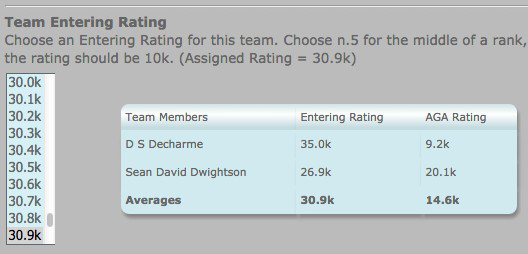
The pairings cycle begins once all players have checked-in (See Tournament Management). Late comers can be checked in after the start of the tournament, at the Tournament Director's discretion. The pairings cycle is best summarized by the simplified diagram above. You can access the pairings module from a tournament's Administration page under Operations: Manage Open Section Pairings or Manage Handicap Section Pairings. This will show a Pairings Control Panel with the following panes:
The Tournament Summary pane shows a brief status of the overall tournament. Here's a fictitious example: 
The Ratings Body (part of the tournament profile) is the 'AGA', it could be the 'EGF' or 'none'. The tournament has two sections, Open and Handicap and (since we are looking at the Handicap Section) there are 7 rounds to be played. The Round Summary (continuing with our fictitious example) shows a brief status of which round is being managed and it's status and some options that have been chosen. Mostly it is self-explanatory. 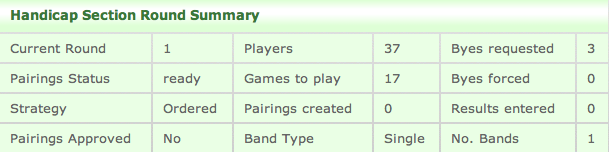
'Strategy : Ordered' shows the default choice in which the initial order of players is sorted (or seeded) by Entering Rating. Other options include: Slide, Fold and Random. 'Band Type : Single' shows a choice to include all players in a single band. Other options include: McMahon, Dan/SDK/DDK/Beginners, Strong/Regular/Beginners, Adult/Youth and Custom. McMahon is the default and sets the number of bands automatically. Custom allows the Tournament Director to apply as many bands as desired. Later, winners of bands are easily identified. Pairings ConfigurationPairings Configuration allows the enthusiastic Tournament Director make changes to any of the default settings for the pairings parameters, set up banned pairs of players and modify if needed requested byes and bye volunteers. By default, the pairings algorithm avoids pairings for players in the same club, city, etc. Settings for these prohibitions can be adjusted to modify or ignore these criteria. Up to six tie-breakers can be configured for the tie-breakers report.BandsThe section on Bands allows the Tournament Director to choose the type of bands preferred and if necessary move players from band to band. Some bands take a little configuring as in where to place the boundary for Beginners.Pairing Round N of MThis is the heart of executing a tournament: where N is the current round and M is the total number of rounds. In this section the Tournament Director can manually pair one or more games, allow the pairings algorithm to generate pairings for all or all remaining unpaired players, edit the resulting auto-generated pairings if needed and record the results of paired games.An Approval step models the flow of declaring pairings and allowing players to find problems. As results for a round are entered, the module recognizes when the next round can be paired. Eventually, once all rounds are complete it recognizes that the tournament (or at least this section) is complete . Pairing ReportsReports are available at all times to:
As results are entered, and at any time, reports can be viewed that summarize the results of all rounds and the state of tie breakers. The Tie breakers Report by default uses the current band settings to display the results of all games, sorted by band, number of wins, then chosen tie-breakers. Winners of each band can thus be rapidly and effectively identified. For an AGA rated tournament, once the last round's results have been entered the AGA Results report can be checked over and emailed to the AGA. Printer friendly versions of the reports can be used to share with players as well as provide a useful backup in the unlikely event there are technical difficulties. Team TournamentsWhen a tournament is held for teams to compete, Team Membership will be reflected in all the above functions. Additionally, the following reports include team statistics, helping the TD determine the winning team:
PreferencesThe following preferences are available:
|
|
ver: 4.2 © 2016 Copyright Robert Cordingley