
GoClubsOnline
|
Login nowLearn more... |
 |
Subscribers Welcome PageAfter successfully logging in a subscriber is presented with a Welcome page. On the left hand side is a navigation column while on the right hand side is shown the current content. Across the top of the page (under the banner) lies the main menu. It includes items for accessing our Privacy statement, About GoClubsOnline, FAQs and More Info... (these pages). Login, Register, Lost Password and Logout are shown when needed. For subscribers, the Welcome page shows an optional Home Club News, a list of Participating Clubs (with links to any club websites), Tournaments Open For On-line Registration, Events Open For On-line Registration, My Memberships (listing the subscriber's memberships in participating clubs), My Home Club (membership is not required: showing the current Club Administrators for the subscriber's Home Club with links for emailing), My Library Loans (showing what publications the subscriber has borrowed from which club and when they are due back)and My Club Account Applications for applying for a new club account. Subscribers Navigation Features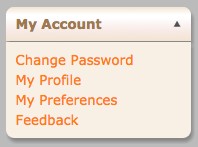
Subscribers can register at GoClubsOnline for free. Once registered and logged in, a subscriber can maintain their own profile information, change their preferences, change their password and use our feedback form from the My Account panel (bottom left on the Home page). Subscribers can choose to be affiliated with a GoClubsOnline participating club under My Preferences - Home Club. This does not require club membership nor does it confer club membership benefits within GoClubsOnline but lets a Club Administrator include them in their local go community when using GoClubsOnline tools. Subscribers selecting a Home Club will also see the Home Club News when enabled by the Club Administrator. 
Subscribers, in the Tournaments panel, can register at any club tournament that is offered. Subscribers can check the details, fees and locations of all tournaments offered. Subscribers can see who plans to attend any particular tournament, what their playing strength might be and which city they are coming from. Afterwards subscribers can see who the winners were (once posted by the Club Administrator) and if our Integrated Pairings module was used what the (cross-tab) full Results were. Subscribers can also check their AGA membership number and expiration data (AGA Ratings) or their EGF membership details (EGF Ratings). Subscribers can also view the availability of events and tournaments from the Calendar. Participating clubs have chosen GoClubsOnline to host their tournament registration process and club management tools. Each club decides when on-line registrations will be accepted and when on-line registration closes. We call this the open period. 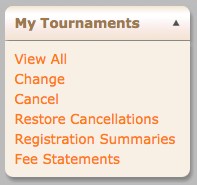
During the tournament's open period subscribers can update their tournament registration, or cancel their registration in the My Tournaments panel. This panel lets subscribers manage all aspects of their tournament participation: reviewing their Registration Summary, reviewing their tournament Fee Statement and, changing or canceling any tournament registrations. 
Subscribers, in the Events panel, can register at any club event that is offered. Subscribers can check the details, fees and locations of all events offered. Subscribers can see who plans to attend any particular event and which city they are coming from. Subscribers can also view the availability of events and tournaments from the Calendar. Participating clubs have chosen GoClubsOnline to host their event registration process and club management tools. Each club decides when on-line registrations will be accepted and when on-line registration closes. 
During the events's open period subscribers can update their event registration, or cancel their registration in the My Events panel. This panel lets subscribers manage all aspects of their event participation: reviewing their Registration Summary, reviewing their event Fee Statement (if applicabele) and, changing or canceling any event registrations. |
|
ver: 4.0.1 © 2016 Copyright Robert Cordingley